Kommuniziere effizienter mit Upgrades bei den Nachrichten
Redaktionelle Anmerkung: Dieser Artikel wurde im Rahmen des Winter-Updates 2024 veröffentlicht. Die Informationen können sich seit der Veröffentlichung geändert haben. Erfahre mehr über unser neuestes Produkt-Update.
Nachrichten sind ein wichtiger Bestandteil einer effektiven Kommunikation als Gastgeber:in. Mit den Upgrades, die wir am Tab „Nachrichten“ vorgenommen haben, kannst du Zeit sparen und Gästen präzise antworten.
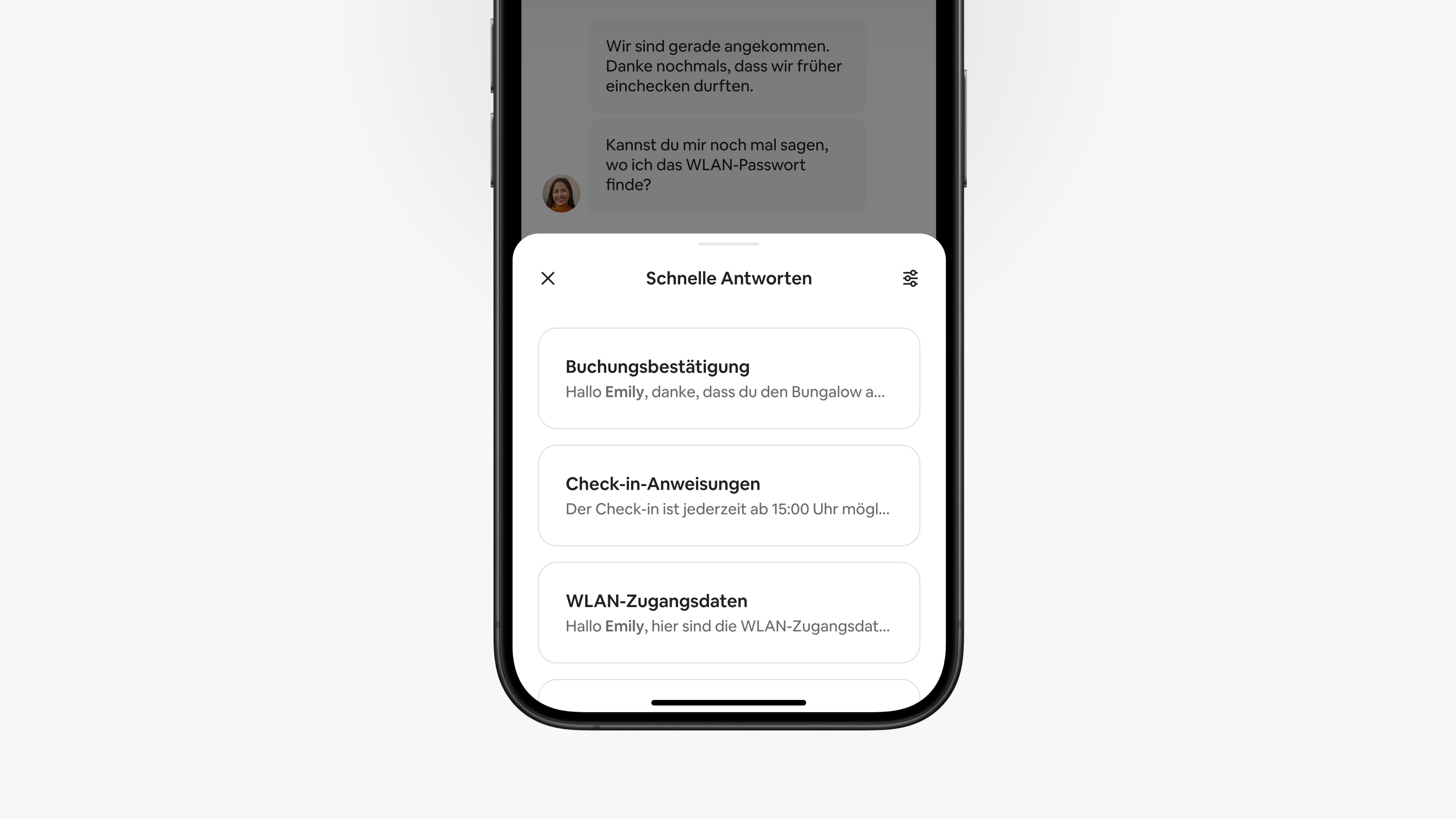
Die neuen Vorlagen für schnelle Antworten enthalten Reaktionen auf häufig gestellte Fragen, damit du nicht alles ganz neu formulieren musst. Du kannst diese Vorlagen bearbeiten und senden, während du dich mit Gästen unterhältst, oder sie für eine spätere Zustellung planen.
Zu den weiteren neuen Funktionen im Tab „Nachrichten“ gehören:
- Thread-Antworten, die dir dabei helfen, deine Unterhaltungen zu organisieren
- Bearbeitungstools, mit denen du gesendete Nachrichten bearbeiten oder das Senden widerrufen kannst
Diese Upgrades werden in den kommenden Monaten für alle Gastgeber:innen eingeführt.
Neue schnelle Antworten
Über ein Dutzend neue Vorlagen für schnelle Antworten bieten dir beispielhafte Reaktionen auf die wichtigsten Fragen von Gästen zu Themen wie Wegbeschreibung, WLAN und Check-out. Verwende einfach eine der vorformulierten Nachrichten oder bearbeite sie so, dass sie zu deinem Stil als Gastgeber:in, deiner Ausstattung oder den Bedürfnissen deiner Gäste passt.
Die neuen Vorlagen enthalten auch Funktionen, mit denen die Kommunikation schneller und einfacher wird.
- Vorschläge: Wenn eine der neuen Vorlagen dir helfen könnte, die Frage eines Gastes zu beantworten, wird automatisch ein KI-Vorschlag für eine schnelle Antwort in deiner Unterhaltung angezeigt (doch nur du kannst diesen Vorschlag sehen). Du kannst die vorgeschlagene Antwort prüfen und bearbeiten, bevor du sie sendest, oder eine andere Nachricht verfassen.
- Details: Die neuen schnellen Antworten enthalten Platzhalter, die automatisch die Namen von Gästen und bestimmte Details der Buchung und des Inserats einfügen, wenn die Nachricht gesendet wird.
- Erinnerungen: Wenn eine von dir geplante Nachricht demnächst gesendet wird, wird dir in deiner Unterhaltung mit dem betreffenden Gast eine Erinnerung angezeigt. Du kannst die Nachricht anpassen oder den Versand verhindern, falls die Nachricht Informationen enthält, die du bereits mitgeteilt hast.
Die neuen Funktionen werden Anfang 2025 verfügbar sein. Bis dahin kannst du unsere aktuellen Tools nutzen, um deine eigenen schnellen Antworten zu erstellen und Nachrichten an Gäste zu planen. Du verlierst keine deiner gespeicherten Vorlagen, wenn wir neue hinzufügen.
Thread-Antworten und Bearbeitungstools
Wir führen Thread-Antworten und Bearbeitungstools ein, die dir bei der Verwaltung deiner Nachrichten helfen.
- Thread-Antworten: Wenn du auf eine bestimmte Nachricht als Thread antwortest, wird deine Antwort unter der ursprünglichen Nachricht angeordnet. Gäste können auf die gleiche Weise antworten und eine Reihe zugehöriger Nachrichten erstellen.
- Bearbeitungstools: Du kannst eine Nachricht innerhalb von 15 Minuten nach dem Absenden bearbeiten und das Senden innerhalb von 24 Stunden widerrufen.